
What Is BenBen TV?
BenBen TV is a simple, fast video player for your own streams and playlists. It plays the links you already have, in one clean place, without a media library, a channel list, or a subscription standing in the way. Paste a link, tap Watch, and your video starts playing.
The important part is what BenBen TV is not. It does not include any channels, content, or live streams. There is no media library inside the app, and it does not sell subscriptions, codes, or playlists. You add your own links or playlists, and the player does the one job of playing them well.
That honesty is the whole appeal. Most players bury playback under recommendations, accounts, and menus. BenBen TV keeps the focus on the video: a clean dark purple player, a list you can search, and controls that stay out of the way until you need them.
What You Get in This First Release
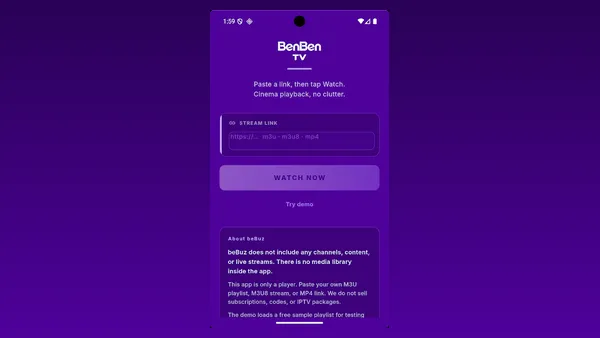
BenBen TV arrives as a focused first release, and the focus shows. The home screen is one job: a stream link box, a Watch button, and a demo option for anyone who wants to see the player work before adding a link of their own.
The player itself covers the basics that matter on a phone: play and pause, 10 second rewind and forward, one tap fullscreen, rotation to landscape, instant mute, and a video fit switch between filling the screen and keeping the original size. Playlist items switch without leaving the player, so a list feels like a list, not a series of restarts.
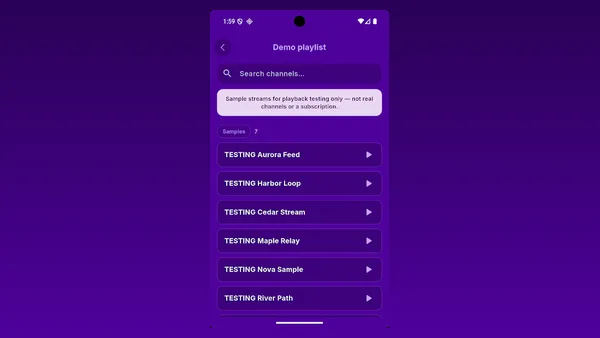
There is also a demo playlist built in for playback testing. It loads free sample streams so you can try the player, the search, and the fullscreen switch before you paste anything of your own. That try it first step is rare in players this simple, and it is the fastest way to learn whether BenBen TV suits your links.
How BenBen TV Works
BenBen TV works in three short steps. First, get the app from the official store listing on the download page and open it. There is no account and no sign up, so the home screen is ready at once.
Second, paste a link. Copy an M3U or M3U8 playlist link, or a direct MP4 or HLS video link, paste it into the stream link box, and tap Watch. If you are not sure how it works yet, tap the demo option instead and the app loads a free sample playlist made for playback testing.
Third, watch and browse. The playlist shows as a clean list with search, so a stream is quick to find. Tap an item to play it, switch items without leaving the player, and use fullscreen, mute, and the 10 second skips as you watch. Playback depends on the link you provide and on your connection: a stream that is offline, restricted, or in an unsupported format will not play, whatever player you use.
Main Features
The feature list stays short on purpose. Every feature below serves playback, and none of them asks for an account or a subscription.
Paste and play
Paste an M3U or M3U8 playlist link, or a direct MP4 or HLS link, and tap Watch. The video starts in a clean, distraction free player.
Clean playlist lists
Browse a playlist as a tidy list, with search to find a stream quickly, even in a long list of items.
Smooth player controls
Play and pause, 10 second rewind and forward, and instant mute and unmute, all within easy thumb reach.
One tap fullscreen
Switch to fullscreen with one tap, or rotate the phone for landscape viewing, and switch the video fit to fill the screen or keep the original size.
Switch without leaving
Move between playlist items without leaving the player, so watching a list feels continuous.
Try the demo first
Not sure how it works? Load the free sample playlist made for playback testing and see the player in action before adding your own links.
No account, no sign up
Open the app and play. There is nothing to register for and nothing to log in to.
Light and quick
A small, fast player that opens quickly and keeps the focus on the video, in a clean dark purple interface.
Formats BenBen TV Plays
The player supports the most common streaming formats, so the playlists and links you already have open in one place. M3U and M3U8 playlist files load as browsable lists. HLS streams play through their M3U8 links. MP4 video files play directly from their links.
That short list is a strength, not a gap. A player that claims every format usually plays several of them badly. It plays its supported formats in a smooth player with the controls described above, and it says plainly that playback depends on the link and the connection.
BenBen TV Screenshots
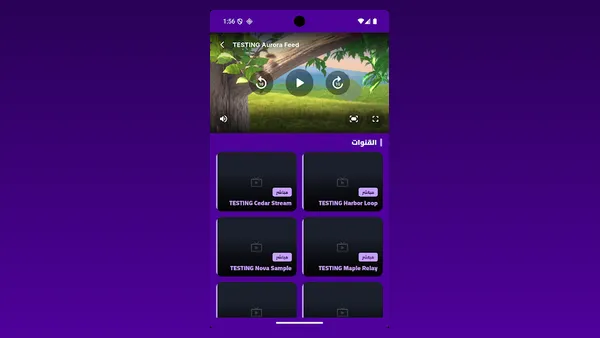
Every screenshot below is a real screenshot from the official store listing, shown in a landscape frame so the carousel stays phone sized on any screen. The home screen shows the link box and the Watch button, the playlist view shows sample streams under a playing video, and the demo playlist shows the sample streams provided for testing. No artwork, no mockup, and no invented screen is used here.

Safety and Honest Play
This player is safe in the specific way that matters for a player: it is honest about what it is. It ships with no channels and no media library, so it cannot surprise you with content you did not add. It sells no subscriptions, codes, or playlists, so there is nothing to be sold to you inside the app.
The app is free and shows ads to support development, which the store listing states plainly. That is the whole commercial story: free to install, ads inside, no subscription, no codes for sale. If any site or message offers a BenBen TV subscription, code, or playlist for sale, it is not coming from this player.
Play only content you have the right to access. That rule is stated on the official listing, and it is worth repeating here, because a player that plays your own links is only as lawful as the links you give it. Use links from sources you trust, and treat a link you cannot verify the same way you would treat any download you cannot verify.
How to Download and Install BenBen TV
Start on the download page of this site. Wait for the short countdown, then tap the download button. It opens the official store listing for BenBen TV in a new tab, which is the only place this site sends you for the app.
On the store listing, tap Install and wait for the download to finish. When the app is ready, tap Open. There is no account to create and no sign up screen, so the home screen appears at once, with the stream link box and the demo option ready.
To play something first, tap the demo option and try a sample stream. Then paste your own M3U, M3U8, or MP4 link into the stream link box and tap Watch. If a link does not play, check the link and the connection first: an offline source, a restricted stream, or an unsupported format will not play in any player, and the troubleshooting section below walks through those checks.
How to Update BenBen TV
BenBen TV updates through the same official store listing you installed it from. Open the store app on your phone, find BenBen TV in your installed apps, and install the update when one is offered. Your playlists and links stay as they were, because an update replaces the player, not your links.
If an update changes how a control looks or where a button sits, try the demo playlist first after updating. It is the fastest way to confirm the player still behaves the way you expect, before you rely on it for a link you care about.
Device Compatibility
BenBen TV works on Android phones and tablets. The player is built for touch screens, with fullscreen on one tap and landscape viewing when you rotate the phone, so a tablet in landscape is a natural fit for longer viewing.
A steady internet connection matters more than a powerful phone. BenBen TV is a small, light player, so older phones handle it well, but a weak connection will stall any stream, whatever device plays it. For the best result, play on Wi-Fi when you can, and keep mobile data for short checks rather than long sessions.
Technical Details
This app is a video player in the Video Players and Editors category, published by STICKER GOLD under the package name com.benben.tv. It is free to install, it shows ads to support development, and it carries an Everyone content rating on the store listing.
Playback covers M3U and M3U8 playlists, HLS streams, and MP4 video files, with a clean list view, search, fullscreen, video fit control, mute control, and 10 second skips. The app keeps no media library and sells no subscriptions, codes, or playlists, and the permissions it needs are listed on the official store page.
Why BenBen TV Is Useful
This player is useful when you already have links and you want a player that respects them. A playlist link from a source you trust becomes a browsable list with search, instead of a file you open one item at a time. A direct MP4 link becomes a video with proper fullscreen and skip controls, instead of a browser tab that fights you.
It is also useful as a second player. Keep your main gallery app for local files and let this player handle links, or use the demo playlist to test a stream before you commit to watching it elsewhere. Because there is no account, trying it costs nothing but a minute, and leaving it costs nothing at all.
For households, the honest design is the useful part. There is no channel list for children to wander into and no subscription to cancel, because the app contains no channels and sells no subscriptions. What plays is exactly what someone in the house pasted.
Pros and Cons
An honest player deserves an honest list, so here is both sides, plainly stated.
Pros
- Clean, fast player for your own M3U, M3U8, and MP4 links
- No account and no sign up: open it and play
- Demo playlist lets you try the player before adding your own links
- Searchable playlist lists, fullscreen, video fit, mute, and 10 second skips
- Small and light at 35.31 MB, with a clean dark purple interface
- Honest design: no channels built in, no subscriptions or codes sold
Cons
- Includes no channels or content: you must add every link yourself
- Playback depends on your links and connection: offline or restricted sources will not play
- Free with ads, which some viewers will notice during long sessions
- No rating history yet, since the app is newly listed and early
- Limited to its supported formats: M3U, M3U8, HLS, and MP4 links
Troubleshooting Common Problems
If a link does not play, check the link first. Open it in a browser or check with the source: an offline source, a restricted stream, or a mistyped address will not play in any player. Re-paste the link carefully, watching for a missing character at the start or the end, which is the most common paste mistake.
If the player opens but the video stalls, check the connection. Switch to Wi-Fi if you are on weak mobile data, and try the demo playlist: if the demo plays and your link does not, the problem is the link or its source, not the player. If nothing plays, restart the app and try again on a fresh connection.
If a playlist loads but an item is missing, search the list before assuming it is gone. Long lists hide items below the first screen, and the search box finds a stream by name in seconds. If the whole list is empty, the playlist link itself may have changed at the source, and re-adding the current link fixes it.
If fullscreen or rotation behaves oddly, rotate the phone once more and tap fullscreen again. The video fit switch also matters: a video set to fill the screen looks different from one kept at its original size, and switching fit back is faster than restarting the stream.
BenBen TV Alternatives
If this player does not fit your links, the fair alternatives are other ways to play what you already have. A phone built in video player handles direct MP4 links well, and it is already on the phone, so it is the simplest fallback for a single file. It will not, however, turn a playlist link into a browsable list, which is where a dedicated playlist player earns its place.
A browser can also open many stream links, but browser playback fights tabs, popups, and sleep settings, and it rarely offers 10 second skips or a clean fullscreen switch. This player exists for the gap between those two options: simpler than a full media centre, and far better at playlists than a browser tab.
For local files already on the phone, a gallery player is the natural home, and BenBen TV does not need to replace it. Use each player for what it does best: local files in the gallery player, and your own links and playlists in this player.